An IPTV trial is the only honest way to judge a streaming service before you hand over a cent. The catch is that most people waste it. They log in, flick through a few channels, watch ten minutes of a film and decide it “seems grand”. Then the first big match of the season arrives, the picture freezes, and the trial told them nothing useful.
This guide fixes that. Below you’ll find a minute-by-minute plan built for a 30-minute IPTV trial, a 50-point scorecard you can fill in as you go, and the red flags that should end a trial early. It’s written for Irish homes, so it covers GAA and Premier League kick-off times, Irish channels, and the kind of broadband most of us actually have.
Key takeaways
- A short IPTV trial is enough if you follow a plan, because the problems that matter show up in the first few minutes of real use.
- Test live sport, channel zapping, the TV guide, video-on-demand and support, in that order.
- Run your IPTV trial at a busy time of day, ideally during a live fixture.
- Score every area out of 10. Anything under 35 out of 50 is a pass on that service.
Why a 30-Minute IPTV Trial Is Enough (If You Plan It)
Many providers advertise 24-hour or even 48-hour trials. That sounds generous, but in practice most people use about 20 minutes of it. A shorter IPTV trial forces you to focus, and the issues that ruin a subscription are not subtle. Buffering, slow channel changes, a broken guide and support that never answers all reveal themselves quickly when you know where to look.
Think of it like a test drive. You don’t need to drive the car for a full day. You need to try the motorway, a roundabout, a hill start and the brakes. A well-planned IPTV trial works the same way: you deliberately put the service under the same pressure it will face on a Sunday afternoon in July, and you see whether it holds.
The other advantage of a focused IPTV trial is that you finish with clear notes rather than a vague impression. When you compare two services, you can compare scores, not feelings.
Before You Press Play: 5-Minute Prep for Your IPTV Trial
Do this before you request your login, so none of your trial minutes are spent on setup chores.
- Pick the device you will really use. If the family watches on the living-room Firestick, test on the Firestick, not on your phone.
- Install the recommended app. Ask the provider which player app they suggest for your device and install it in advance.
- Run a speed test. Use a free tool such as Speedtest by Ookla on the same device and write down the result. Around 10 Mbps is enough for HD, and 25 Mbps or more is comfortable for 4K.
- Check the fixture list. Find a live match, race or event that will be on during your IPTV trial. Live sport is the hardest test there is.
- Open a note. Copy the scorecard from further down this page into your phone’s notes app so you can score as you go.
Tip: If you can, plug your TV or box into the router with an Ethernet cable for the IPTV trial. Then test once more on Wi-Fi at the end. That way you learn whether any problem comes from the service or from your home network.
The Minute-by-Minute IPTV Trial Plan
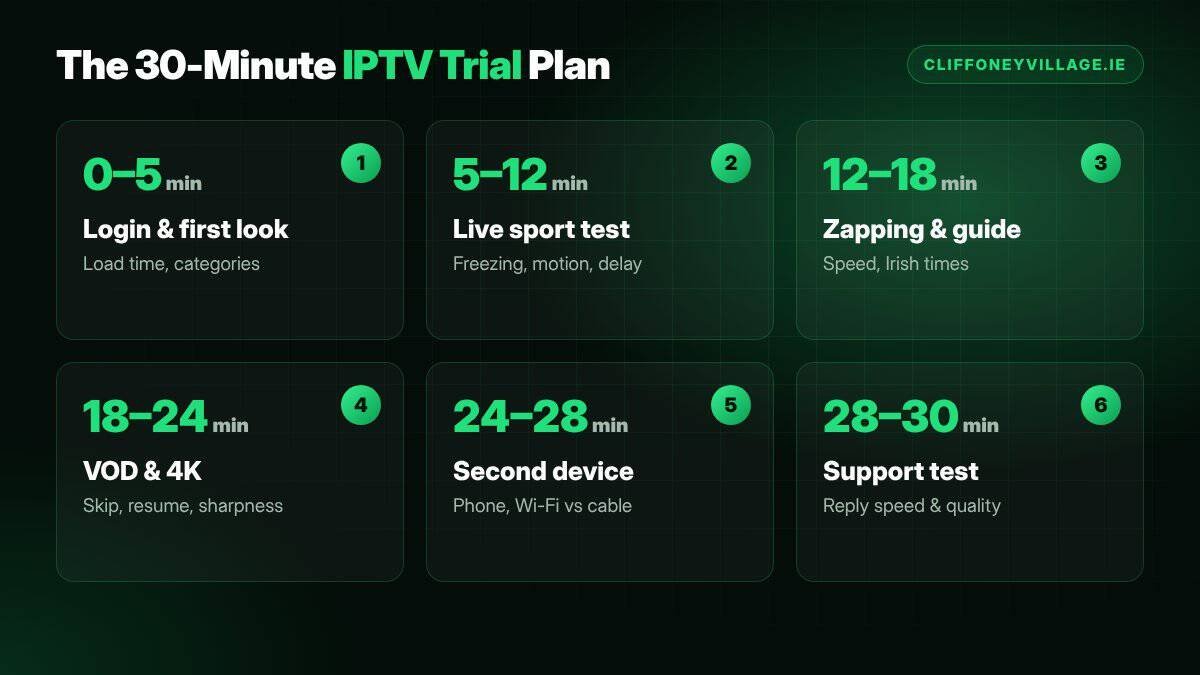
Set a timer and work through each block. The times are a guide, not a rule, but try to cover every block before your IPTV trial ends.
Minutes 0–5: Login and First Impressions
Enter your login details and note how long it takes for the channel list to load. A good service loads its categories in a few seconds. Check that the categories make sense: Irish channels, UK channels, sport, films, kids and so on. If you have to scroll through thousands of unlabelled channels to find RTÉ One, that is a usability problem you will live with every day.
Minutes 5–12: Live Sport Stress Test
Go straight to a live sports channel. This is the most important part of any IPTV trial. Watch for at least five minutes without touching the remote and look for three things:
- Freezing or buffering: any pause with a spinning wheel is a warning sign, especially if it repeats.
- Motion quality: fast action like a long kick-out or a counter-attack should look smooth, not blocky.
- Delay: if you have a radio commentary or a friend’s text messages, compare how far behind the stream is. A delay of several seconds is normal for internet TV; a delay of a minute is not.
Minutes 12–18: Channel Zapping and the TV Guide
Switch between ten channels quickly, the way you would during an ad break. Count roughly how long each one takes to start. Under two or three seconds feels natural. Then open the electronic programme guide (EPG). Check that programme times are correct for Irish time and that tonight’s schedule is filled in, not blank.
Minutes 18–24: Video-on-Demand and 4K Check
Open the films or series section and start something recent. Skip forward to the middle, then back again. A healthy service lets you jump around without long waits. If the provider offers 4K, try one 4K title and confirm that your TV actually shows it in 4K rather than a soft, upscaled picture.
Minutes 24–28: Second Device Test
If you plan to watch on more than one screen, log in on a phone or tablet and check that the same account works there too. This is also the moment to switch your main device from Ethernet to Wi-Fi and see whether the picture changes.
Minutes 28–30: Support Test
Send the provider a simple, genuine question on WhatsApp, such as “Which app do you recommend for a Samsung TV?” Note how long the reply takes and whether it actually answers you. Support quality is part of your IPTV trial. A service that ignores you while you are a potential customer will not improve once you’ve paid.
Score Your IPTV Trial: A Simple 50-Point Scorecard
Give each area a score out of 10. Be strict: a 10 means you couldn’t fault it, a 5 means it was usable but annoying.
| Area | What a 10 looks like | Your score |
|---|---|---|
| Live sport stability | No freezing during five minutes of live action | __ / 10 |
| Picture quality | Sharp HD, smooth motion, real 4K where offered | __ / 10 |
| Channel zapping | Channels start in about two seconds | __ / 10 |
| Guide and layout | Correct Irish times, tidy categories, easy to find channels | __ / 10 |
| Support | Fast, friendly reply that solves your question | __ / 10 |
| Total | 45+ excellent, 35–44 good, under 35 walk away | __ / 50 |
If you run an IPTV trial with two or three services, this table makes the decision almost automatic. The highest score wins, and you’ll know exactly why.
Adapt the Plan to the Way Your Household Watches
The plan above suits most homes, but every household has its own priorities. Spend a few extra minutes on whichever of these sounds like you.
For Sports Fans
Double the live sport block. Try two different sports channels, because each one can come from a different source. If you follow the GAA, look for a hurling or football match and pay attention to the high ball into the square: fast, unpredictable movement is where weak streams fall apart. If you follow the Premier League, a 3pm Saturday slot is the ideal test because so many people are streaming at once.
For Families With Kids
Check the kids’ categories carefully. Are the cartoon channels easy to find? Can a child navigate the menu without help? Also check whether the app offers a way to hide or lock adult categories. A service that works brilliantly for you but confuses the rest of the family will cause arguments by the second week.
For Film and Box Set Lovers
Spend more time in the video-on-demand library. Search for three specific titles you actually want to watch rather than browsing at random. Check whether series are organised by season and episode, whether subtitles are available, and whether the picture stays sharp on a large screen. Then pause a film, leave it for two minutes and resume. Some players lose their place, which becomes very irritating over a long series.
For People Watching Abroad or on the Move
If you travel for work or spend summers away, test the service on mobile data as well as home broadband. Note how quickly the picture adjusts when the signal drops. A good service steps down to a lower quality smoothly instead of freezing completely.
How to Compare Two IPTV Trials Side by Side
The most reliable way to choose is to run two trials on the same evening, one after the other, on the same device and the same connection. Keep everything else identical so the only thing that changes is the service.
- Same channel: watch the same live channel on both services for five minutes each.
- Same time slot: run them within an hour of each other so server load is similar.
- Same scorecard: fill in a fresh copy of the 50-point table for each one.
- Same question: send both providers the identical support question and compare replies.
Comparing like for like stops you being swayed by things that don’t matter, such as a flashier menu or a bigger channel number in an advert. The service that performs better under identical conditions is the one that will serve you better all year.
What a Good Provider Does During Your Trial
You’re testing the provider’s behaviour as much as its streams. A trustworthy service will usually:
- Send clear setup instructions for your specific device, not a generic wall of text.
- Tell you exactly how long the trial lasts and what happens when it ends.
- Answer questions honestly, including “no” when something isn’t supported.
- Explain plans and prices plainly, with no pressure to decide on the spot.
- Point you to written terms so you know your rights before buying.
If the experience feels rushed, pushy or vague, take that as part of the result. The way a provider treats you during a trial is a preview of how it will treat you when you need help.
Red Flags That Should End an IPTV Trial Early
Some problems are so serious that there’s no point finishing the plan. Stop your IPTV trial and move on if you see any of these:
- The trial requires your card details “just to verify” before you can watch anything.
- Live channels freeze more than once in the first five minutes on a wired connection.
- Half the channel list shows “no signal” or a black screen.
- The guide is empty or shows the wrong times for every channel.
- Your support message is ignored, or the reply pressures you to buy a long plan immediately.
- The provider can’t tell you clearly what you are paying for, how long it lasts or how to cancel.
IPTV Trial vs Money-Back Guarantee: What’s the Difference?
Some services skip the IPTV trial and offer a money-back guarantee instead. Both can protect you, but they work differently. A free trial lets you test without paying anything, so there’s no risk at all. A money-back guarantee means you pay first and ask for a refund if you’re unhappy, which relies on the provider keeping its promise.
In Ireland, buying online also comes with legal protections. The Competition and Consumer Protection Commission explains your rights when you buy services at a distance, including cancellation rules. Our advice is simple: use a no-card IPTV trial first, then read the provider’s terms and conditions before you buy.
Common IPTV Trial Mistakes Irish Viewers Make
After helping many customers through their first test, we see the same mistakes again and again.
Testing at the Quietest Time of Day
An IPTV trial at 11am on a Tuesday tells you very little. Servers are busiest on weekend afternoons and weekday evenings, exactly when you’ll want to watch. Book your test for a busy slot.
Only Watching Films
Video-on-demand is the easiest thing to stream because it can buffer ahead. Live TV can’t. If you only test films, you haven’t tested the hard part.
Blaming the Service for a Weak Connection
A router in the back bedroom, three walls away from the TV, will struggle with any service. That’s why the Ethernet-then-Wi-Fi comparison in the plan matters. It separates network problems from service problems.
Forgetting to Test Support
People rarely think about support until something goes wrong. Sending one question during your IPTV trial costs you thirty seconds and tells you a great deal.
Keep Your IPTV Trial Notes for Later
Don’t throw your scorecard away once you’ve decided. Save it in your phone with the date, the device you used and the connection type. Those notes become surprisingly useful months later. If the service ever seems worse than it used to, you can compare against your original IPTV trial results and tell support exactly what has changed. If you move house or switch broadband provider, you can run the same 30-minute plan again and see whether the new connection makes a difference. Good notes turn a one-off test into a benchmark you can use for as long as you watch.
What Happens After Your IPTV Trial Ends
When the trial finishes, your access simply stops. With a reputable provider, nothing is charged and nothing renews. If the service scored well, you can choose a plan that matches how you watch. Our guide to IPTV subscription costs breaks down which plan length gives the best value, and our IPTV provider checklist lists the questions worth asking before you pay.
If the service scored badly, don’t feel you owe anyone anything. That’s the whole point of an IPTV trial: you learned what you needed to know for free.
Ready to run your own IPTV trial?
Cliffoney Village IPTV offers a free 30-minute trial with no card details. Tell us your device on WhatsApp and we’ll send your login with a setup guide.
IPTV Trial FAQs
How long should an IPTV trial last?
Thirty minutes is enough if you follow a plan like the one above. Longer trials are nice, but most people never use the extra time. What matters is testing live sport, zapping, the guide, video-on-demand and support.
Is an IPTV trial really free?
A genuine IPTV trial should not ask for any payment or card details. If a provider insists on a card for a “free” trial, treat it as a red flag.
When is the best time to run an IPTV trial?
During a busy period, ideally while a live match is on. Weekend afternoons and weekday evenings put the most pressure on servers, so they give you the most honest result.
Can I use an IPTV trial on more than one device?
Usually yes, though often one at a time. Ask the provider before you start, and test your main TV first.
What internet speed do I need for an IPTV trial?
About 10 Mbps for HD and 25 Mbps or more for 4K. A wired Ethernet connection gives the most reliable results.
Final Thoughts
A free IPTV trial is a gift, but only if you use it well. Prepare for five minutes, follow the 30-minute plan, score each area honestly and stop early if you see a red flag. Do that, and you’ll choose a service that works on the days that matter most, not just on a quiet weekday morning. New to all of this? Start with our complete guide to IPTV in Ireland, or contact our team with any question.